

Competition Member Check-in
This article is targeted at the competition administrators and coordinators and provides an overview of the Member Check-in feature.
Competition Members can check in and out of the competition which can assist you with the following:
- Tracking attendance
- Awareness of arrival and availability to officiate
Check-in/check-out can be facilitated in the following ways:
- A competition member can check-in and out if the Competition Administrator has enabled the feature.
- A competition admin or coordinator can check-in/check-out a member on their behalf
Depending on your desired experience and purpose for leveraging the feature you may choose either scenario.
For example, if you wish to physically sight match officials upon arrival before they officiate their games and to pass on important updates you etc you choose to not enable the feature for members but manually check-in/check-out the members yourself.
Enabling member check-in/check-out
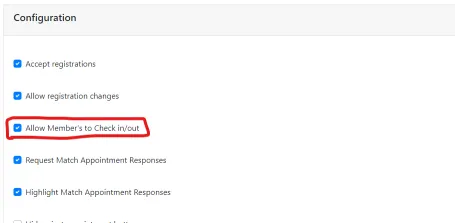
Section titled “Enabling member check-in/check-out”To enable the ability for members to check-in and check-out on their own. From the Edit Competition page, ensure the All Member’s to Check in/out is checked.
Member Check-in/Check-out
Section titled “Member Check-in/Check-out”Members can check-in or check-out from the Competition info page.
NOTE: This requires the setting to be enabled.
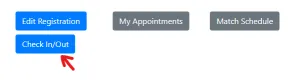
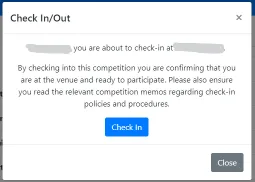
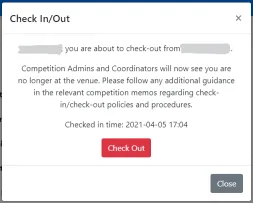
This will show the following prompts depending on the current check-in/check-out status.
Competition Administrators & Coordinators check-in or check-out members
Section titled “Competition Administrators & Coordinators check-in or check-out members”Competition Administrators and Coordinates can check-in or check-out members on their behalf. This is available regardless of the configuration setting.
From the Management Members feature.
! membercheckin-button-managemembers.png

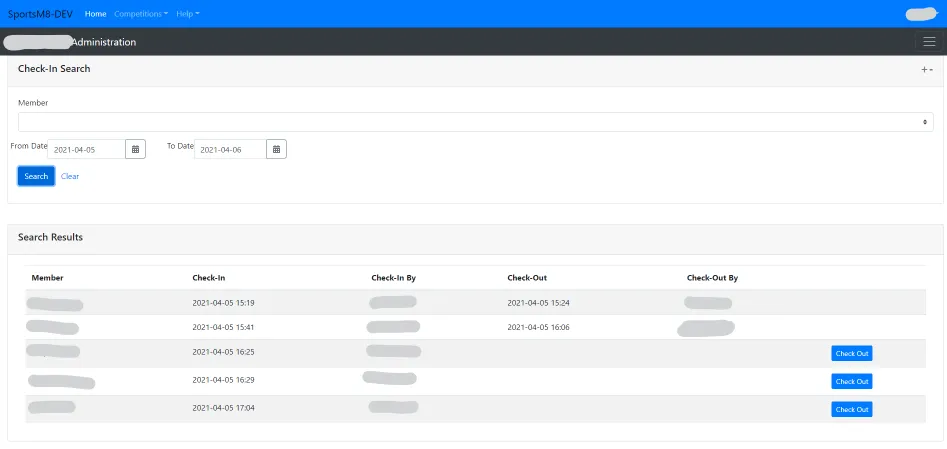
Also available from the Check-In Search.
Check-In Search
Section titled “Check-In Search”This feature is available to Competition Administrators and Coordinators from the Competition Admin Portal.
Future capabilities
Section titled “Future capabilities”The Check-in status will be included as columns on the various reports across the platform.