

View Match Official Appointments
After registering for a competition, and once the competition coordinators have published the appointments you can view the appointments through our web apps.
Competition Coordinators can elect to lock down certain capabilities based on the current state of the competition which may alter your experience. Should you find that certain capabilities are not available but you expect them to be then you should check with the competition coordinators on when those capabilities wil be a available.
View your appointments
Section titled “View your appointments”To view your appointments, the competition will be shown on the match official app home page.
- From our home page locate the competition in the list of my competitions.
- Click the Competition Log
- From the presented navigation options select “My Appointments” button.
- On the next page use the filters to select the competition day you wish to view the appointments for. By default it will show the current date if there are matches scheduled for today.
How do I know if all Appointments are Published (Released)
Section titled “How do I know if all Appointments are Published (Released)”As a match official (referee) at an competition, we understand that having information about the published state of the time slots is important and avoids unnecessary follow up with the coordinators. This includes easily knowing:
- “Are all the time slots published/released”
- “If not what time slot are they released until”
Competition Coordinators/Administrators can elect to disable the visibility of this information depending on the nature of their competition. In those situations. your best point-of-contact is the competition coordinator.
When viewing My Appointments you will see a banner indicating the status of the appointments which may appear as the following examples:
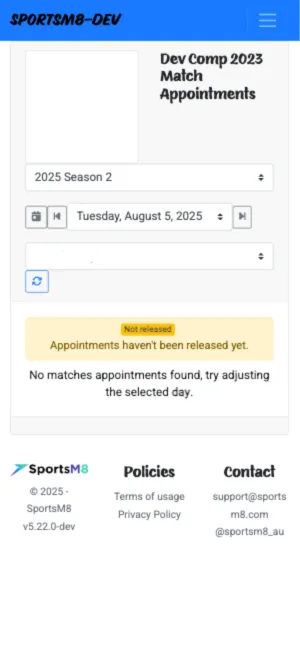
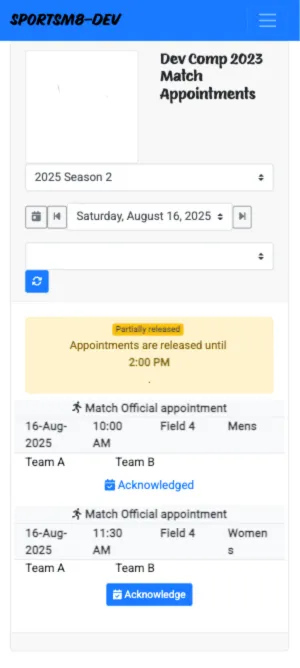
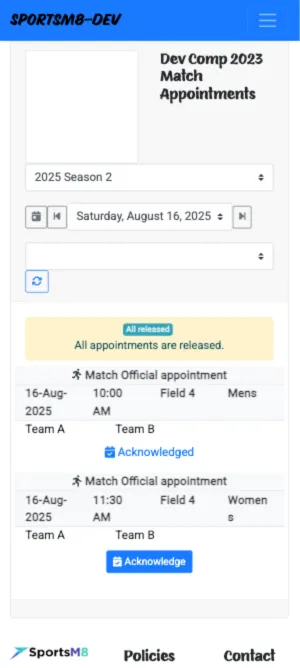
Similar banners will also be visible on the Kiosk and other interfaces where relevant.